humanizer
The Prompt Index AI Humanizer review: a useful word-by-word comparison
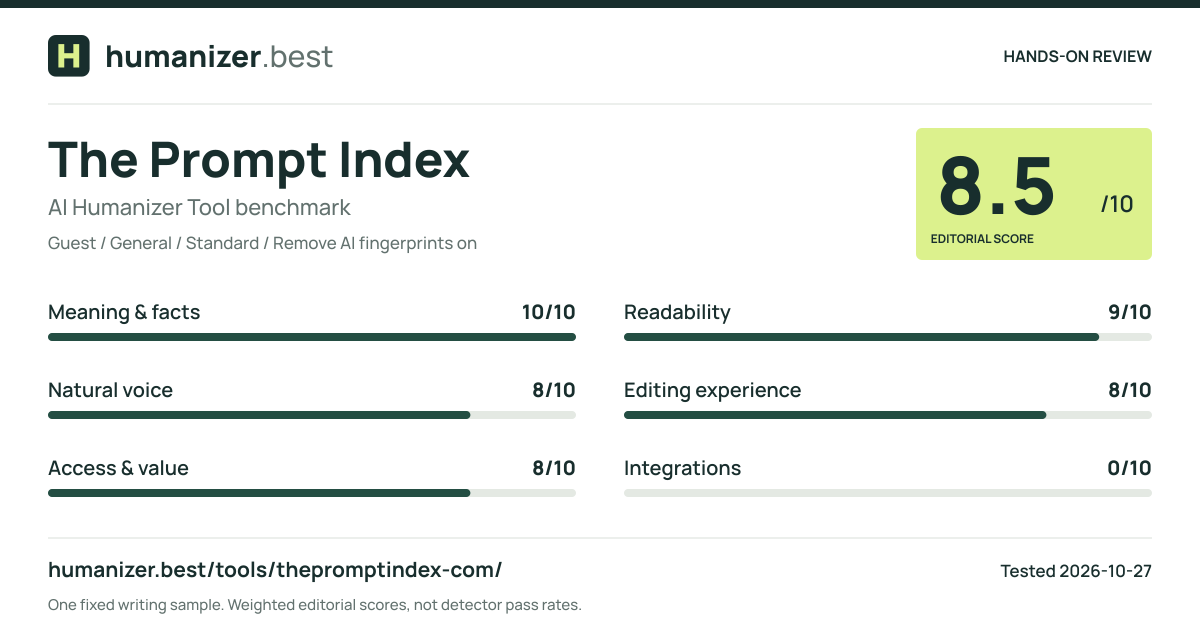
A restrained free rewrite kept the facts intact. Its Compare tab makes inserted and removed words visible, with clear run-based limits.
The screenshots, complete input and output, feature table and scoring breakdown are on the separate tool profile.
View The Prompt Index tool details and evidenceA restrained rewrite with a useful comparison view
The Prompt Index made relatively small changes to our library paragraph and kept its meaning intact. It preserved the six-week trial, the 40-hour opening week, the changed days, both attendance figures and the lack of a productivity measurement. It also retained the cautious conclusion and the planned winter follow-up. For this test, restraint worked well.
The more distinctive feature was the Compare tab. It showed removed words with strikethrough and additions with underlining and color. We could see where “productivity was not measured” became “nobody measured productivity,” rather than rereading two unmarked blocks and trying to remember the differences. That is useful even when the rewrite is good: an editor still needs to approve each change.
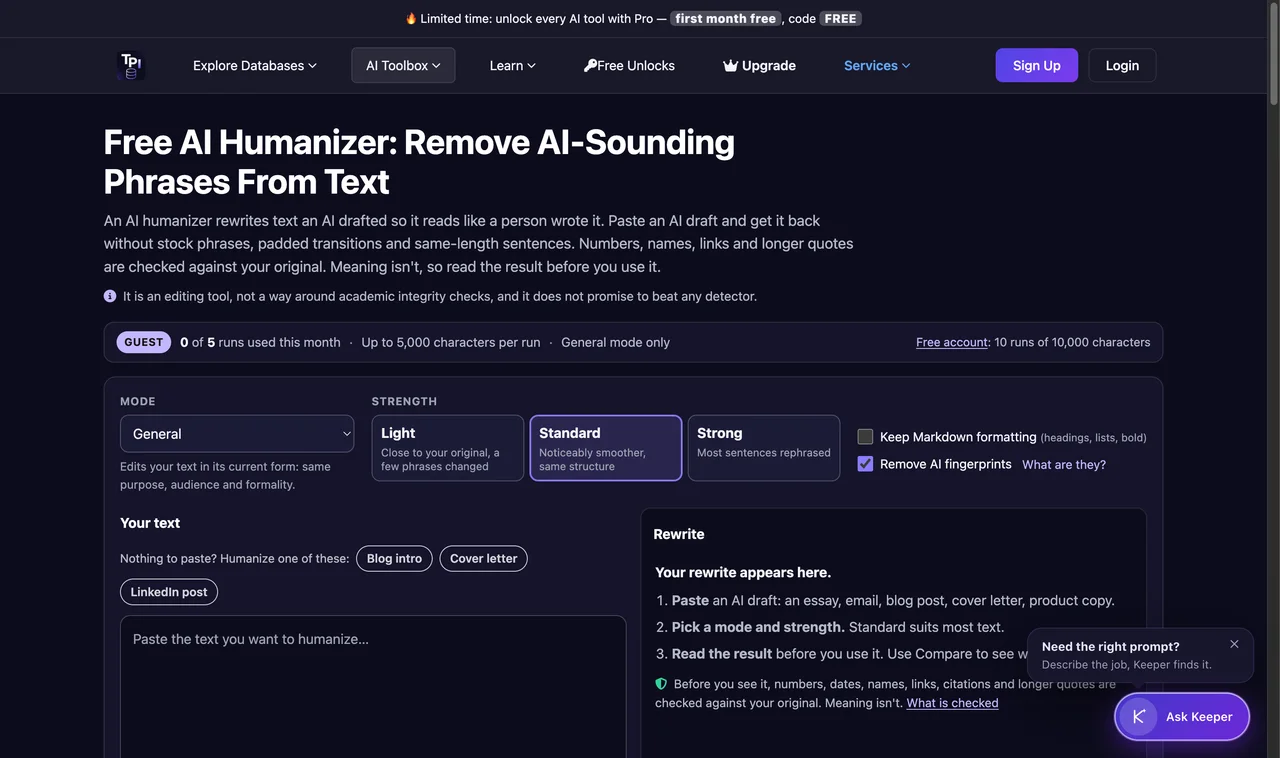
We used the guest allowance, General mode and Standard strength. The Remove AI fingerprints option was enabled by default, and Keep Markdown formatting was off. We entered the complete 93-word benchmark. The first actual generation returned the paragraph published on the tool profile and increased the guest counter from zero to one. The page's own timer showed 1.7 seconds; we did not independently measure server latency.
The result is one of the stronger examples in our tested set for this particular task. That conclusion comes from the preserved details and the visible comparison, rather than a claim about passing an AI detector. The tool itself distinguishes its editing workflow from a guarantee about detection.
What changed in the paragraph
The first sentence stayed the same. That is a reasonable editorial choice: it already states who ran the experiment, what changed and how long the trial lasted. We do not give a humanizer extra points merely for replacing a sentence that did not need rewriting.
The second sentence adds “by” and “on” to clarify how the hours were rearranged. The unchanged 40-hour total remains explicit. Closing on Wednesday and extending Monday and Thursday evenings still appear together, so a reader does not mistake the experiment for a reduction in total weekly service.
The attendance sentence moves “weekly” before “visits” and replaces “although” with “though.” Both changes are modest. The numbers remain 1,200 and 1,320, and Wednesday visitors still have to change their plans. The output does not introduce a claim that the schedule alone caused the increase.
The productivity sentence is particularly helpful. “Nobody measured productivity” is direct, readable and faithful to the source. The tool did not turn fewer interruptions into a productivity gain. It also did not remove the qualification to make the experiment sound more successful.
The final two sentences remain cautious. Longer evenings may suit people who work during the day, but the trial does not show that all libraries should open fewer days. Residents will still be surveyed, costs compared and the trial repeated in winter. Travel habits may be different; the rewrite does not invent a direction for that difference.
There are small stylistic choices a writer might reverse. “May suit” is slightly less concrete than “may help,” and “plans to” makes the final action sound a little less firm than “will.” In the context of an uncompleted proposal, neither change materially alters the paragraph. A report with strict wording requirements could retain the original verbs through manual editing.
Why a small rewrite can be a good result
A common way to judge rewriting software is to ask how different the output looks. That is a poor fit for factual editing. Large changes create more opportunities to introduce an unsupported place, reverse a qualification or obscure a number. A useful humanizer should be able to leave a sound sentence alone.
Our source was already fairly clear. It did not contain a grand introduction, marketing claims or a string of repetitive transitions. The Prompt Index therefore had little obvious filler to remove. Its result shows a light adjustment of syntax and rhythm rather than a wholesale replacement of the passage.
That also limits what we can conclude about the product. This example does not test whether it can repair a badly organized essay or turn stiff corporate prose into a distinctive personal voice. It demonstrates that the default Standard workflow can make modest edits without losing the deliberately planted facts and caveats.
We would be comfortable using this output as a draft after the normal editorial check. We would not take the score as permission to skip that check on the next document. A short successful sample is evidence about that sample; it does not establish an error rate across genres, languages or document lengths.
The tool profile has the full text and screenshots, including the Compare view. You can inspect each edit there and decide whether you prefer the source's wording; accepting the overall score need not mean accepting every stylistic change.
The word-by-word comparison
After generation, the tool offered Rewrite and Compare tabs. We opened Compare. It displayed the original and revision next to each other, with removed and added words marked separately. The page reported 33 words changed under its own counting method. We treat that figure as interface information, not a quality score.
The visual distinction uses more than color. Removed words have strikethrough, while additions have underlining. That helps explain the edit even if a reader does not immediately associate the colors with deletion and insertion. The screenshot on the tool profile records the actual comparison we saw.
This is a verified word-highlighting feature, so the review receives that filter tag. We do not extend the claim to a dedicated line-by-line or sentence-rewrite interface. Word diffs and sentence controls solve different problems: one exposes an edit; the other generates or selects another version of part of the text.
A Copy rewrite button is available beside the result. An Edit in Writing Assistant control offers a route into a separate editing tool, but we did not score that destination as a tested inline editor. Likewise, we did not treat the linked detector as an independent evaluation of this output.
The comparison view can become narrow because the result area itself contains two columns. It is still useful for spotting individual changes, and readers can open our screenshot at its original size. For reviewing longer documents, we would want to test scrolling, paragraph alignment and how the interface handles a large number of edits. Those behaviors were outside this short-paragraph session.
Controls and defaults
General mode was the available guest mode. The page also listed specialized modes for paid plans. We did not switch into one of those modes or infer its quality from the General output. A label such as Academic or Technical describes an intended workflow; it does not by itself prove better handling of citations or code.
The strength choices were Light, Standard and Strong. We left Standard selected. That matters when comparing the screenshot with someone else's result: changing strength may alter both the amount of rewriting and the chance of semantic drift. Our score belongs to the settings recorded here.
Remove AI fingerprints was enabled. We did not run an additional fingerprint-only cleanup or compare enabled and disabled versions. The benchmark contains ordinary prose, so this test cannot tell you much about the handling of unusual whitespace, formatting artifacts or pasted rich text.
Keep Markdown formatting was off, and the input had no Markdown structure to protect. Claims about preserving tables, code blocks or quotations require a different test document. We read the product's explanation of its checks, but we did not independently validate every rule described there.
No account was needed for the completed guest run. The page kept the selected controls visible with the result, which helps someone comparing screenshots understand the settings behind this draft.
Pricing: requests and characters, not a single word budget
The plan table separates the number of runs from the maximum characters in each run. Guests were listed as receiving five runs per calendar month with up to 5,000 characters per run. A free account increased that to ten runs per 30 days and 10,000 characters per run. Our own request used one guest run.
Basic was shown at $9.99 per month for 100 runs per 30 days and up to 25,000 characters per run. Pro was shown at $29.99 per month for 1,000 runs per 30 days and up to 50,000 characters per run. The page also described separate history retention by plan. These were the displayed limits on the test date; we did not purchase a subscription.
The billing unit matters. A short paragraph and a much longer eligible passage each occupy a run, subject to the plan's input limit. That differs from a tool that simply deducts the input word count from a monthly total. Neither model is automatically better. Your typical document size and how often you regenerate determine which allowance is useful.
The page also describes daily safety caps and limits on failed attempts. We would therefore avoid summarizing a paid allowance as unrestricted processing. A monthly run count does not remove other operational limits. Heavy users should read the current plan details before deciding that a nominal request budget covers their workflow.
We did not redeem the promotional free-month offer displayed elsewhere on the page. Our Free tag refers to the guest generation we completed, not a trial that may require a subscription or checkout. That distinction helps readers who want to test a tool without beginning a recurring billing relationship.
What the product checks, and what we checked
The Prompt Index explains that it compares certain factual tokens against the input and may reject rewrites that change them. It also explicitly says that meaning is not fully checked. That is a helpful description of scope, but it remains a product claim until tested with inputs designed to challenge those checks.
Our benchmark supplies a smaller observation: the returned output retained all the details we were checking. We cannot tell from a successful result whether a protection rule rejected an earlier internal attempt, whether the model simply followed its instructions, or how the implementation would behave on a more difficult case. We do not need to infer those internal details to judge the paragraph we received.
The fictional input lets us judge fidelity directly: the source defines what the report says. It does not test whether the tool can verify a real library's figures. That would require outside evidence even if every number survived the rewrite unchanged.
The page discloses that text may be processed by external model providers. We did not conduct a privacy or infrastructure audit, and our public benchmark contains no private information. Anyone considering confidential documents should examine the current policy and their own organization's requirements separately from this writing-quality review.
Integrations and the final recommendation
We did not verify an official API, MCP server or agent skill for this specific humanizer in the reviewed product navigation. The wider site has prompt and skill-related resources, but a skill generator elsewhere on the site is not evidence that this humanizer has an installable agent skill. We have not applied those integration tags.
That leaves the browser workflow as the demonstrated capability. For occasional manual editing, it offers a useful combination: a modest free allowance, a faithful first rewrite and a clear view of individual changes. For an automated pipeline, the integration requirement remains unresolved.
The Prompt Index is a strong option to try if you care about inspecting edits rather than simply receiving a different paragraph. Its default result respected the limits of our library example. The free run cap is tighter than some competitors' advertised allowances, but the comparison feature may save more review time than an extra unmarked rewrite would.
The 8.5/10 rating belongs to this General/Standard run. The test kit provides the same sample for readers who want to repeat it. Longer structured documents would need a separate check of both the rewrite and the crowded comparison view.
Sources and test scope
- Official editor, Compare tab and usage/pricing table · checked 2026-10-27
One English passage and the first guest Standard output. Paid plans, external detectors and integrations were not run. A vendor timer is not a controlled speed benchmark.